

8 Signs Your API Developer Portal Is Not Helping Developers

Quick Answer: What is an API developer portal?
An API developer portal is a centralized, self-service website where API consumers find, understand, test, access, and integrate with a company's APIs. Documentation explains what an API does; the portal provides developers with the tools and workflows to use it.
Core parts of an API developer portal:
- API catalog and discovery: Helps developers search available APIs, compare versions, understand use cases, and choose the right API faster.
- Interactive documentation: Gives developers endpoint references, request and response examples, authentication guidance, onboarding guides, SDKs, and sample code.
- Self-service access management: Lets developers register applications, request subscriptions, generate API keys, create OAuth credentials, and track approval status.
- Testing and experimentation: Gives developers sandboxes, mock responses, test credentials, sample data, and safe non-production environments before production integration.
- Operations and support: Helps developers monitor usage, error rates, response times, release notes, support requests, bug reports, and troubleshooting paths.
- Business and governance controls: Helps the organization manage monetization, billing integration, usage plans, security policies, and access to sensitive APIs.
Below, we cover what portals do, how they differ from API catalogs, the eight signs of failure, and how APIwiz connects portal workflows to governance, observability, and access control.
What does a developer portal do?
A developer portal helps API consumers move from discovery to production with less manual help. It turns API documentation into a workflow: find the API, understand the use case, test the request, request access, receive credentials, monitor usage, and get help.
In practice, a portal supports five jobs:
- Discovery and education: searchable API catalog, versions, use cases, interactive docs, SDKs, and sample code.
- Access management: app registration, API key provisioning, OAuth clients, subscriptions, approvals, and clear access status.
- Testing: API playgrounds, "Try It" consoles, sandboxes, mock responses, and test credentials.
- Operations and support: usage dashboards, error rates, response times, release notes, forums, and bug reports.
- Business and governance: monetization, billing integrations, plans, usage controls, security policy, and API product control.
The best portals connect the API catalog, API gateway, identity provider, documentation pipeline, analytics backend, and support workflow.
How is an API developer portal different from an API catalog?
An API catalog is the inventory of APIs; an API developer portal is the self-service experience for consuming those APIs. The catalog answers "What APIs exist?" The portal answers, "Can I understand, test, access, and use this API successfully?"
A catalog usually tracks API names, owners, domains, lifecycle status, versions, metadata, and policies. A portal turns that inventory into API product pages, tutorials, sandbox access, credentials, onboarding, support, and usage visibility.
A portal without a strong catalog becomes a polished front door with poor inventory behind it. A catalog without a portal does not remove the friction that stops developers from using APIs.
What are the must-have features of a good API developer portal?
A good API developer portal needs five feature groups: discovery, documentation, testing, access management, and analytics.
- Discovery: Helps developers find the right API through search, filters, ownership details, lifecycle status, product grouping, version labels, and recommended API paths.
- Documentation: Helps developers understand how to use an API through OpenAPI or Swagger docs, use-case guides, request and response examples, error references, changelogs, SDKs, and version guidance.
- Testing: Helps developers validate behavior before production through API explorers, mock servers, test tenants, sample payloads, valid credentials, and stable sandbox data.
- Access management: Helps developers get authorized access through SSO, app registration, API keys, OAuth clients, subscriptions, approvals, rate limits, and usage terms.
- Analytics and support: Helps developers and API owners improve adoption through search success, drop-off points, usage dashboards, support routing, bug reporting, release notes, and feedback loops.
Stripe and Twilio are useful developer experience references because they combine API reference pages, guides, examples, SDKs, and onboarding paths that move developers from reading to implementation.
What are the 8 signs your developer portal is not helping developers?
Your developer portal is failing when developers still need human help for basic discovery, evaluation, access, testing, and production adoption.
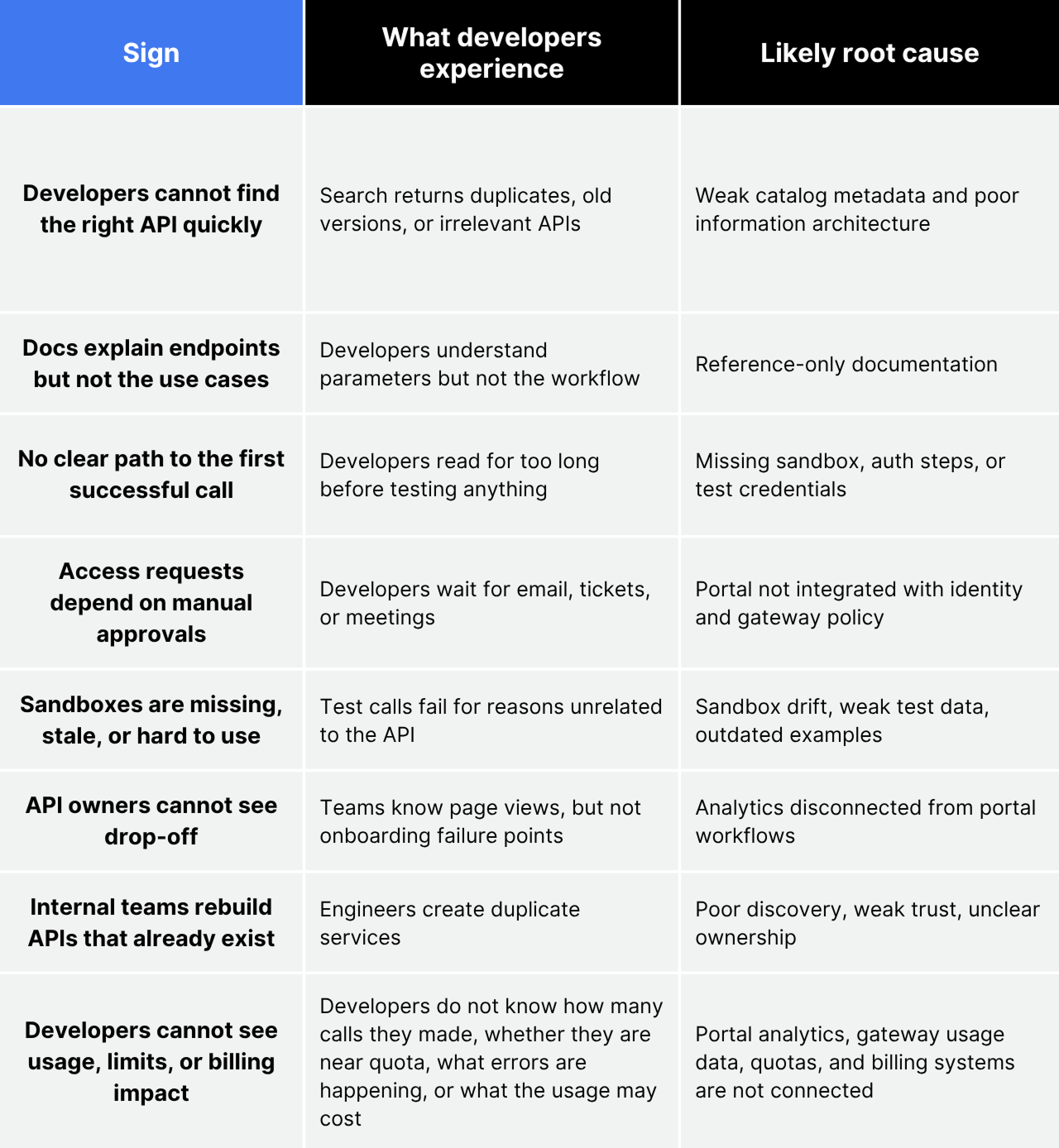
If several of these signs show up together, the problem is usually deeper than missing content or an outdated interface.
Developer portals fail when they are treated as content repositories instead of connected workflows. The eight signs above usually point to the same issue: discovery, documentation, access, testing, analytics, and ownership are managed in separate systems.
A visual redesign will not fix that. A helpful portal needs reliable metadata, task-based documentation, self-service access, safe test environments, usage visibility, and feedback loops for API owners.
How do you create an API developer portal that helps developers?
Create a helpful API developer portal by designing around the developer journey, not the content repository. The goal is to help API consumers find the right API, understand the use case, test safely, request access, reach a first successful call, and keep using the API in production.
Use this sequence:
1. Define the audience: decide whether the portal serves internal teams, partners, external developers, or a hybrid mix, because each audience needs different access rules, documentation depth, and support paths.
2. Choose the platform model: decide whether to build, buy, use open source, extend a cloud-native portal, or adopt an API management platform based on governance, integration, and maintenance needs.
3. Design the information architecture: organize APIs by products, domains, developer journeys, filters, lifecycle status, and version labels so developers can find the right API quickly.
4. Integrate core systems: connect the portal to the API gateway, identity provider, catalog, analytics, support workflows, and CI/CD pipeline so the portal reflects real API operations.
5. Automate documentation: use OpenAPI, Swagger, examples, changelogs, and SDK snippets so docs stay current as APIs change.
6. Implement self-service onboarding: support SSO, app creation, approvals, API keys, OAuth credentials, and rate limits so developers can move without manual handoffs.
7. Measure and improve: track search success, TTFC, adoption, drop-off, support tickets, and reuse so the portal improves based on developer behavior.
Start with one high-value API product or domain, then expand once onboarding, support, and reuse metrics improve.
Should you build or buy your API developer portal?
Build for a custom internal platform strategy; buy when speed, governance, support, and enterprise API workflows matter more.
Custom builds offer full control but require long-term engineering ownership. Open-source portals are flexible, but teams own their setup, upgrades, and plugins. Cloud-native portals work well when the API program is standardized on one cloud gateway, but they can be limiting for multi-cloud or gateway-agnostic teams.
Documentation-first tools are useful for public API teams focused on docs and SDK quality. Enterprise API programs usually need a broader API management platform that connects discovery, governance, access, observability, portal workflows, and monetization.
This is where platforms like APIwiz become an alternative to a custom build. Instead of building and maintaining a portal, catalog, access workflow, observability layer, and governance model separately, teams can use APIwiz to connect developer portal workflows with API discovery, access control, lifecycle governance, usage analytics, and monetization readiness.
How should a developer portal connect to the API ecosystem?
A developer portal should connect to the API gateway, identity provider, API catalog, documentation pipeline, analytics backend, and support workflow.
API producers maintain specs, documentation, examples, and lifecycle updates. The OpenAPI or AsyncAPI pipeline keeps reference docs, examples, changelogs, and version details up to date. The API catalog provides ownership metadata, lifecycle status, domains, versions, and discovery context.
The identity provider authenticates developers and supports role-based access. The API gateway enforces policies, API keys, OAuth clients, rate limits, and runtime access.
Sandboxes and mock environments let developers test safely before production integration. Analytics, observability, and support workflows close the loop with usage, errors, drop-off points, feedback, and bug reports.
Disconnected portals create friction: docs live in one system, access requests in another, credentials arrive via email, and support tickets lack API-owner context.
How do you measure developer portal success?
Measure developer portal success by developer outcomes, not content volume or page views.
Track time-to-first-call, signup-to-first-call conversion, search success rate, failed-search terms, API adoption, API reuse rate, portal-to-production conversion, support ticket reduction, and access approval cycle time.
Time-to-first-call, or TTFC, matters because a developer has not truly onboarded until they can make a successful API call.
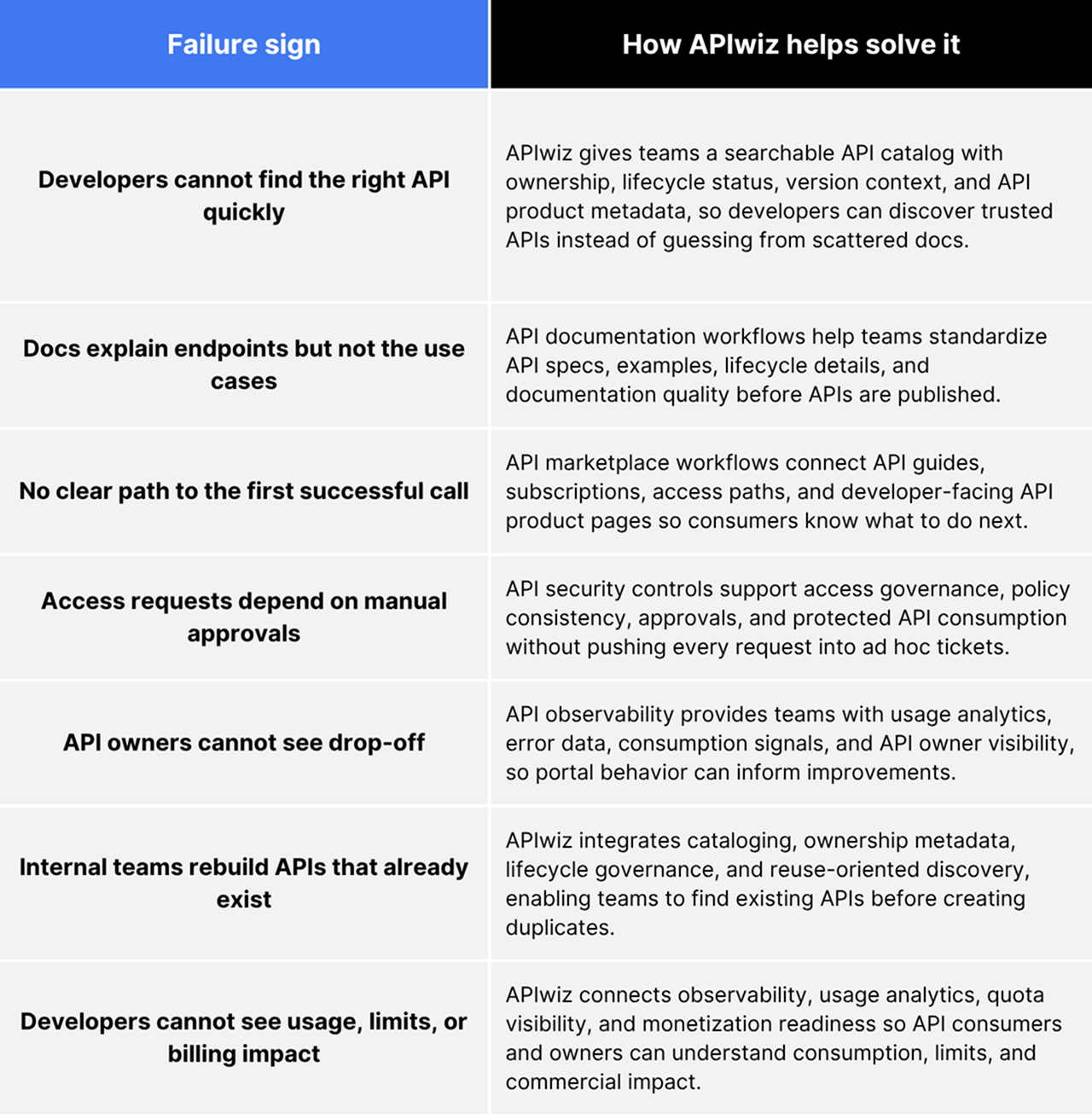
How does APIwiz approach API developer portals?
APIwiz approaches API developer portals as part of the full API lifecycle, not as a standalone documentation surface. The portal is connected to API discovery, cataloging, governance, access workflows, observability, and distribution.
What is the future of API developer portals?
The future of API developer portals is more personalized, automated, and connected to AI-assisted API consumption.
Expect portals to move toward:
- AI-powered API search
- Automated code samples
- Documentation generation from OpenAPI and AsyncAPI
- Personalized onboarding by role, product, and use case
- Predictive troubleshooting based on common errors
- Self-service access with stronger policy controls
- MCP-aware API and tool discovery
- Agent-specific credentials, scopes, and analytics
AI does not remove the need for portal governance. If agents and developers can discover APIs faster, organizations need stronger control over approved APIs, access, exposed data, and usage monitoring.
Conclusion
A developer portal is only successful when developers can move faster with less help. It needs trustworthy discovery, task-based documentation, working sandboxes, self-service access, API owner visibility, and outcome-based metrics.
Book an APIwiz demo to see how APIwiz connects developer portal workflows with API discovery, governance, security, observability, and distribution.
FAQs
What is an API developer portal?
An API developer portal is a self-service website where developers discover, learn, test, request access to, and consume APIs. It usually includes API documentation, code samples, authentication guidance, sandbox testing, subscription workflows, usage analytics, and support paths.
What is the difference between an API catalog and a developer portal?
An API catalog is the inventory of APIs, while a developer portal is the user experience for consuming them. The catalog tracks APIs, owners, versions, lifecycle status, metadata, and governance signals. The portal turns that inventory into a path for documentation, testing, access, credentials, support, and adoption.
What is the difference between an API gateway and a developer portal?
An API gateway controls runtime API traffic, while a developer portal helps developers discover and consume APIs. The gateway handles routing, authentication, authorization, throttling, rate limiting, and policy enforcement. The portal handles documentation, onboarding, subscriptions, sandbox testing, and support.
Why do developer portals fail?
Developer portals fail when they publish content but do not remove friction from the developer journey. Common reasons include weak search, stale documentation, missing sandbox access, manual approvals, unclear ownership, disconnected analytics, and page-view-based success metrics.
Should you build or buy your developer portal?
Build when your team has unique workflows and sufficient platform engineering capacity to maintain the portal long-term. Buy or adopt a platform when you need faster launch, integrated access workflows, governance, observability, support, and API lifecycle management.
Related reads
- API Management Goes Beyond the API Gateway
- Hidden Cost Of API Sprawl
- Your API Gateway Is Lying To You
- How Healthy Is Your API Program
- How To Evolve APIs
- What Is API Observability
Effortless API Management at scale.
Support existing investments & retain context across runtimes.
.webp)
Effortless API Management at scale.
Support existing investments & retain context across runtimes.